Status: public, MIT-licensed, early-stage (v0.1.0). The library is inspectable and exercised by a Jest test suite with CI on Node 20/22, but it’s pre-1.0 with no stable release. It’s distributed as source on GitHub — there is no published npm package under this name (that name on the registry belongs to an unrelated author). The “What’s Needed To Tighten” section is the honest gap list.
InfiniteContext is a TypeScript memory layer that lets AI applications work past the context window — storing, organizing, and retrieving large amounts of information across storage tiers instead of cramming everything into one prompt. It ships as a Node library and a CLI (infinite-context), with OpenAI wired in for embeddings and summarization.
Three Hierarchies
The system layers at three distinct levels:
- Storage tiers — a
Memory Routerfronts pluggable providers (local disk today, Google Drive via the cloud provider, with a commonStorageProviderinterface for adding more), so hot and cold memory live where they belong. - Multi-level summarization — a
SummarizationEnginecompresses content into summaries at several levels of abstraction, so long histories can be served without replaying everything verbatim. - Hierarchical bucket organization — content is filed into a domain/topic bucket tree and retrieved through a
HierarchicalRetriever, with automatic categorization deciding where new content lands.
What’s Implemented Today
- Vector retrieval — exact flat index artifacts that persist and support rebuild / merge / split / save / load, plus an approximate HNSW backend (
hnswlib-node, with graceful flat fallback) that the hierarchical retriever switches to per-trace above a ~2,000-item threshold for sub-linear search at scale. A committed, key-free benchmark (docs/retrieval-benchmark.md) measures the HNSW backend against exact flat search: recall@10 = 0.995 at N=1,000 (≈1.3× p50 speedup), scaling to ~24× p50 speedup at 100k vectors — i.e. near-exact results at a fraction of the latency. - Hierarchical bucket store — domain→topic organization with a multi-strategy retriever, covered by tests.
- Automatic categorization — a
PromptCategorizerroutes content using keyword, vector-similarity, and adaptive strategies, with a category cache. - Multi-level summarization — OpenAI-driven summaries at configurable abstraction levels (real
chat.completionscalls), with a deterministic extractive fallback when no LLM client is configured. - Negation-aware retrieval — Widdows orthogonal negation, so “X but not Y” queries subtract the negated subspace (with a design note connecting it to compositional/DisCoCat meaning).
- Pluggable storage — local and Google Drive providers behind one interface.
- Robustness layer — transaction management with rollback, data-integrity verification, backup/recovery, and data portability (JSON / JSONL / CSV import-export).
Technical Stack
- Language: TypeScript (Node library +
infinite-contextCLI) - Vector index: exact flat (persisted artifacts) + approximate HNSW via
hnswlib-nodefor retrieval at scale (IVF reserved) - Embeddings / summarization: OpenAI (
text-embedding-3-smallby default) - Storage: local filesystem, Google Drive; SQLite / MongoDB / Redis client deps present for backends
- Tests / CI: Jest, GitHub Actions on Node 20 + 22
- License: MIT
- Docs: API, Architecture, Categorization, Compositional Meaning, Memory Monitoring, Extending, llamafile, macOS setup
What’s Needed For This Entry To Tighten
- A tagged stable release (it’s at v0.1.0). An install path already exists if wanted: the bare npm name
infinite-contextis taken by another author, but the package’s actual scoped name@ototao/infinite-contextis unpublished (free) — so shipping to npm is a choice, not a blocker. - A hosted demo or a recorded end-to-end run (ingest → store → retrieve) a visitor can verify without cloning.
- A labeled retrieval-quality eval. The committed benchmark above measures HNSW’s fidelity to exact search (approximation quality + speedup), not end-to-end answer quality against ground-truth relevance — that’s the next benchmark to add.
Verification
Full proof report → All claims, all projects →- Shipped
Exact flat vector store with persisted, rebuildable index artifacts (save/load/merge/split), plus an approximate HNSW backend for retrieval at scale
src/core/VectorStore.ts (persisted exact flat artifacts), src/utils/IndexManager.ts (flat + hnswlib-node HNSW, graceful flat fallback), src/core/HierarchicalRetriever.ts (per-trace HNSW ANN above a 2,000-item threshold); tests/core/VectorStore.test.ts
- Shipped
Hierarchical bucket memory with a multi-strategy retriever
src/core/{Bucket,MemoryManager,HierarchicalRetriever}.ts; tests/core/{Bucket,HierarchicalRetriever}.test.ts
- Shipped
Automatic prompt/output categorization with keyword, vector-similarity, and adaptive strategies
src/categorization/PromptCategorizer.ts + strategies/
- Shipped
Multi-level summarization via OpenAI embeddings/completions
src/summarization/SummarizationEngine.ts
- Shipped
Negation-aware retrieval (Widdows orthogonal negation)
src/core/NegationAwareRetrieval.ts; tests/core/NegationAwareRetrieval.test.ts
- Shipped
Pluggable storage tiers — local disk and Google Drive behind a common provider interface
src/providers/{StorageProvider,LocalStorageProvider,GoogleDriveProvider}.ts
- Shipped
Continuous integration on Node 20 and 22 (build + test)
.github/workflows CI; Jest suite under tests/
Repository README
InfiniteContext
An extensible memory architecture providing virtually unlimited context for AI systems.
Overview
InfiniteContext is a TypeScript library that provides a structured way to store, organize, and retrieve large amounts of contextual information across different storage tiers. It's designed to solve the context limitation problem for AI systems by creating a robust, hierarchical memory architecture that seamlessly scales from local to cloud storage.
Key Features
- Hierarchical Bucket System: Organize information by domain and topic in a hierarchical structure
- Automatic Categorization: Intelligently categorize prompts and outputs into appropriate buckets
- Tiered Storage Architecture: Use different storage providers from local disk to cloud services
- Vector-Based Retrieval: Efficient semantic search across all stored information
- Multi-Level Summarization: Automatic generation of summaries at different levels of abstraction
- Extensible Storage: Add custom storage providers to integrate with any system
- OpenAI Integration: Ready-to-use integration with OpenAI for embeddings and summarization
- Robust Error Handling: Comprehensive error handling with custom error types and recovery mechanisms
- Data Integrity: Verification and repair of data integrity to prevent corruption
- Backup & Recovery: Automated backup and recovery of stored data
- Data Portability: Export and import data in various formats (JSON, JSONL, CSV)
- Flat Vector Index Artifacts: Exact, persisted vector indices for rebuild, merge, split, save, and load workflows
- Transaction Management: Atomic operations with rollback capability
Installation
npm install @ototao/infinite-context
Basic Usage
import { InfiniteContext } from '@ototao/infinite-context';
import { OpenAI } from 'openai';
// Create an OpenAI client for embeddings and summarization
const openai = new OpenAI({
apiKey: process.env.OPENAI_API_KEY
});
// Initialize the system
const context = new InfiniteContext({
openai,
embeddingModel: 'text-embedding-3-small'
});
await context.initialize();
// Store content in a bucket
const chunkId = await context.storeContent(
'InfiniteContext provides virtually unlimited memory for AI systems through distributed storage.',
{
bucketName: 'documentation',
bucketDomain: 'product',
metadata: {
source: 'readme',
tags: ['documentation', 'overview']
}
}
);
// Retrieve relevant content
const results = await context.retrieveContent('How does InfiniteContext work?');
for (const { chunk, score } of results) {
console.log(`Score: ${score.toFixed(3)}`);
console.log(`Content: ${chunk.content}`);
}
// Generate summaries
const summaries = await context.summarize(longText, { levels: 3 });
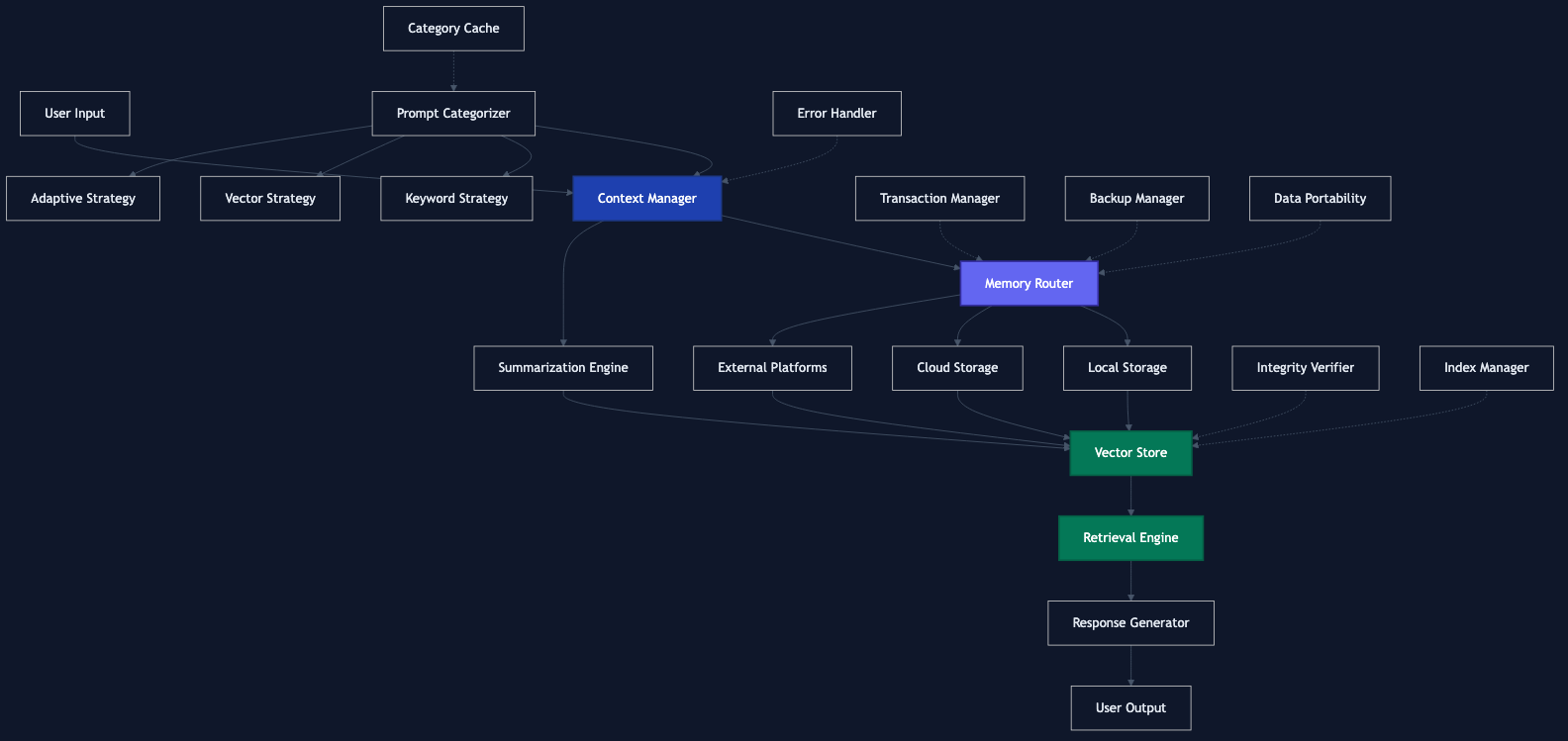
Architecture
The system is designed with a modular architecture:
graph TD
A[User Input] --> B[Context Manager]
B --> C[Memory Router]
C --> D[Local Storage]
C --> E[Cloud Storage]
C --> F[External Platforms]
D --> G[Vector Store]
E --> G
F --> G
G --> H[Retrieval Engine]
H --> I[Response Generator]
I --> J[User Output]
K[Summarization Engine] --> G
B --> K
%% Categorization system
R[Prompt Categorizer] --> B
R --> S[Keyword Strategy]
R --> T[Vector Strategy]
R --> U[Adaptive Strategy]
V[Category Cache] -.-> R
%% Other utilities
L[Error Handler] -.-> B
M[Transaction Manager] -.-> C
N[Integrity Verifier] -.-> G
O[Backup Manager] -.-> C
P[Data Portability] -.-> C
Q[Index Manager] -.-> G
Core Components
- MemoryManager: The main entry point that coordinates all components
- Bucket: Organizes chunks into domains and hierarchies
- VectorStore: Handles storage and retrieval of embeddings
- StorageProvider: Interface for different storage systems
- SummarizationEngine: Generates summaries at different levels
- PromptCategorizer: Automatically categorizes prompts and outputs into appropriate buckets
Utility Components
- ErrorHandler: Comprehensive error handling with custom error types
- TransactionManager: Atomic operations with rollback capability
- IntegrityVerifier: Verification and repair of data integrity
- BackupManager: Automated backup and recovery of stored data
- DataPortability: Export and import data in various formats
- IndexManager: Exact flat-index artifact management; approximate HNSW/IVF backends are reserved for a future release and fail explicitly if requested
Vector Index Support
InfiniteContext's first functional release does not support approximate vector indexing. The built-in VectorStore performs exact in-memory search and persists two files when saved:
<path>.jsonfor chunk payloads<path>.index.jsonfor a real flat index artifact containing indexed ids, positions, embeddings, and chunks
IndexManager supports exact flat index rebuild, merge, split, save, and load artifact workflows. IndexType.HNSW and IndexType.IVF remain reserved enum values for future backends; operations using those types return false or throw through validation paths instead of reporting fake success.
For a quantified comparison of exact flat search against an approximate HNSW index (recall@k and p50/p95 latency at 1k/10k/100k synthetic vectors), see docs/retrieval-benchmark.md. Run it with npm run bench:retrieval.
Storage Providers
InfiniteContext comes with built-in providers:
- LocalStorageProvider: Uses the local filesystem
- GoogleDriveProvider: Stores data in Google Drive
You can add custom providers by implementing the StorageProvider interface.
Advanced Features
Google Drive Integration
const context = new InfiniteContext({
openai,
embeddingModel: 'text-embedding-3-small'
});
await context.initialize({
addGoogleDrive: true,
googleDriveCredentials: {
clientId: process.env.GOOGLE_CLIENT_ID!,
clientSecret: process.env.GOOGLE_CLIENT_SECRET!,
redirectUri: 'http://localhost:3000/oauth2callback',
refreshToken: process.env.GOOGLE_REFRESH_TOKEN!
}
});
Custom Embedding Function
const context = new InfiniteContext({
basePath: './custom-storage',
embeddingFunction: async (text) => {
// Your custom embedding implementation
// Must return a Vector (number[])
}
});
Backup and Recovery
// Create a backup of all data
const backup = await context.createBackup({
includeVectorStores: true,
maxBackups: 5 // Keep only the 5 most recent backups
});
console.log(`Backup created: ${backup.id}`);
// List available backups
const backups = await context.listBackups();
console.log(`Available backups: ${backups.length}`);
// Recover from a backup
const recovered = await context.recoverFromBackup({
backupId: backups[0].id,
overwriteExisting: false
});
if (recovered) {
console.log('Recovery successful');
}
Data Portability
// Export chunks to a file
const exportResult = await context.exportChunks(chunks, {
format: 'json',
outputPath: './export/data.json',
compress: true,
includeEmbeddings: true
});
console.log(`Exported ${exportResult.count} chunks to ${exportResult.path}`);
// Import chunks from a file
const importResult = await context.importChunks({
inputPath: './export/data.json.gz',
bucketName: 'imported',
bucketDomain: 'external',
decompress: true
});
console.log(`Imported ${importResult.succeeded} chunks`);
Data Integrity
// Verify the integrity of a chunk
const verificationResult = await context.verifyChunkIntegrity(chunk, storedHash);
if (verificationResult.isValid) {
console.log('Chunk is valid');
} else {
console.log(`Chunk integrity issues: ${verificationResult.errors.length}`);
// Try to repair the chunk
const repairedChunk = await context.repairChunk(chunk, verificationResult);
if (repairedChunk) {
console.log('Chunk repaired successfully');
} else {
console.log('Chunk could not be repaired');
}
}
Automatic Categorization
// Initialize with categorizer enabled
const context = new InfiniteContext({
openai,
categorizerOptions: {
cacheSize: 1000,
enableLearning: true
}
});
await context.initialize({
initializeCategorizer: true
});
// Store a prompt and output with automatic categorization
const prompt = 'Explain how JavaScript promises work.';
const output = 'JavaScript promises are objects that represent...';
const chunkId = await context.storePromptAndOutput(prompt, output, {
metadata: {
source: 'user-question',
tags: ['javascript', 'async']
}
});
// Override automatic categorization with manual bucket assignment
const overrideId = await context.storePromptAndOutput(
'What are the best practices for data visualization?',
'When creating data visualizations, follow these best practices...',
{
// Manual override provides feedback to improve future categorizations
overrideBucket: {
name: 'visualization',
domain: 'data'
}
}
);
// Update the categorizer when adding new buckets
await context.updateCategorizer();
For more details, see the Categorization documentation.
Flat Vector Index Artifacts
// The first functional release always recommends the supported exact flat index.
const params = await context.getOptimalIndexParams(
chunks.length,
chunks[0].embedding.length
);
console.log(`Supported index type: ${params.type}`); // "flat"
// Estimate memory usage for the flat index.
const memoryUsage = await context.estimateIndexMemoryUsage(params, chunks.length);
console.log(`Estimated memory usage: ${memoryUsage / (1024 * 1024)} MB`);
// Rebuild writes an actual JSON artifact. HNSW/IVF requests are rejected until
// approximate backends are implemented end-to-end.
const rebuilt = await context.rebuildIndex(chunks, params, './vector-indices/chunks.flat-index.json');
if (!rebuilt) {
throw new Error('Index rebuild failed');
}
Setup Guide for macOS
This comprehensive guide will walk you through setting up InfiniteContext on macOS. For more detailed instructions, see the macOS Setup Guide.
Prerequisites
macOS Requirements
- macOS 10.15 (Catalina) or newer
- At least 4GB of RAM (8GB+ recommended)
- 1GB of free disk space
Required Software
- Node.js (v16.x or newer)
- npm (v7.x or newer)
- Git
API Keys
- OpenAI API key (for embeddings and summarization)
- Google API credentials (optional, for Google Drive integration)
Installation Steps
Step 1: Install Node.js and npm
If you don't have Node.js installed:
# Using Homebrew (recommended)
brew install node
# Verify installation
node --version # Should be v16.x or newer
npm --version # Should be v7.x or newer
If you prefer to manage multiple Node.js versions:
# Install nvm (Node Version Manager)
curl -o- https://raw.githubusercontent.com/nvm-sh/nvm/v0.39.3/install.sh | bash
# Install and use Node.js v18
nvm install 18
nvm use 18
Step 2: Clone the Repository
# Clone the repository
git clone https://github.com/OtotaO/InfiniteContext.git
cd InfiniteContext
# Install dependencies
npm install
Step 3: Configure Environment Variables
Create a .env file in the project root:
touch .env
Add your API keys and configuration:
# OpenAI API Key (required for embeddings and summarization)
OPENAI_API_KEY=your_openai_api_key_here
# Google Drive Integration (optional)
GOOGLE_CLIENT_ID=your_google_client_id
GOOGLE_CLIENT_SECRET=your_google_client_secret
GOOGLE_REDIRECT_URI=http://localhost:3000/oauth2callback
GOOGLE_REFRESH_TOKEN=your_google_refresh_token
# Storage Configuration (optional)
STORAGE_BASE_PATH=~/infinite-context-data
Step 4: Build the Project
# Build the TypeScript code
npm run build
Step 5: Run Basic Tests
# Run tests to ensure everything is working
npm test
Advanced Configuration
Google Drive Integration
To set up Google Drive integration:
- Create a Google Cloud project at https://console.cloud.google.com/
- Enable the Google Drive API
- Create OAuth 2.0 credentials
- Run the authorization flow to get a refresh token:
# Create a script to get the refresh token
cat > get-google-token.js << 'EOF'
import { OAuth2Client } from 'google-auth-library';
import http from 'http';
import url from 'url';
import open from 'open';
import dotenv from 'dotenv';
dotenv.config();
const CLIENT_ID = process.env.GOOGLE_CLIENT_ID;
const CLIENT_SECRET = process.env.GOOGLE_CLIENT_SECRET;
const REDIRECT_URI = 'http://localhost:3000/oauth2callback';
const SCOPES = ['https://www.googleapis.com/auth/drive.file'];
const oauth2Client = new OAuth2Client(CLIENT_ID, CLIENT_SECRET, REDIRECT_URI);
async function getRefreshToken() {
const authUrl = oauth2Client.generateAuthUrl({
access_type: 'offline',
scope: SCOPES,
prompt: 'consent'
});
console.log('Authorize this app by visiting this URL:', authUrl);
await open(authUrl);
return new Promise((resolve, reject) => {
const server = http.createServer(async (req, res) => {
try {
const queryParams = url.parse(req.url, true).query;
const code = queryParams.code;
if (code) {
res.writeHead(200, {'Content-Type': 'text/html'});
res.end('Authentication successful! You can close this window.');
const {tokens} = await oauth2Client.getToken(code);
console.log('Refresh token:', tokens.refresh_token);
server.close();
resolve(tokens.refresh_token);
}
} catch (e) {
reject(e);
}
}).listen(3000);
});
}
getRefreshToken().catch(console.error);
EOF
# Install required packages
npm install google-auth-library open
# Run the script
node get-google-token.js
- Add the refresh token to your
.envfile
Memory Monitoring
Enable memory monitoring to get alerts when storage thresholds are reached:
await context.initialize({
enableMemoryMonitoring: true,
memoryMonitoringConfig: {
bucketSizeThresholdMB: 100,
providerCapacityThresholdPercent: 80,
monitoringIntervalMs: 60000 // Check every minute
}
});
// Add a custom alert handler
context.addMemoryAlertHandler((alert) => {
console.log(`ALERT: ${alert.message}`);
// Send notification, email, etc.
});
Troubleshooting
Common Issues
"Error: No embedding function available"
- Make sure you've provided a valid OpenAI API key
- Check that the embedding model is available in your OpenAI account
"Error: EACCES: permission denied"
- Check file permissions in your storage directory
- Run with sudo (not recommended) or adjust permissions
"Error: Cannot find module"
- Ensure you've run
npm installandnpm run build - Check import paths in your code
- Ensure you've run
Debugging
Enable debug logging by setting the DEBUG environment variable:
DEBUG=infinite-context:* node your-script.js
Maintenance
Backups
Create regular backups of your data:
// Create a backup
const backup = await context.createBackup({
backupPath: '/Users/yourusername/backups',
includeVectorStores: true
});
console.log(`Backup created: ${backup.id}`);
Updates
Keep the library updated:
# Pull latest changes
git pull
# Update dependencies
npm update
# Rebuild
npm run build
License
MIT
Related work
-
in-development
Memory Mind Mesh — Living Memory for AI
AI memory that learns from feedback. Responses get more accurate and more concise the more they're used — instead of decaying as the model drifts. Hybrid static + adaptive store.
-
beta
SUM — Verifiable Bidirectional Knowledge Distillation
Cryptographic provenance for AI knowledge transforms. Every transform — render, extract, compose, slider — emits a signed receipt anyone can verify offline. Six-regime compliance validators (EU AI Act, GDPR, HIPAA, SOC 2, ISO 27001, PCI DSS) and a layered sum verify --explain output landed in v0.7.0; current release is v0.8.1. Same bytes verify identically in Python, Node, and modern browsers.
-
in-development
HFAO — Hugging Face Agent Observatory
Observe and debug AI agents in production. Trace every step an agent takes, evaluate outputs against expected behavior, and watch quality drift before users do. Open-source, standards-native (OpenTelemetry GenAI + OpenInference), MCP-queryable, Apache-2.0.