SUM

BitNet SME — Domain Expert System Framework

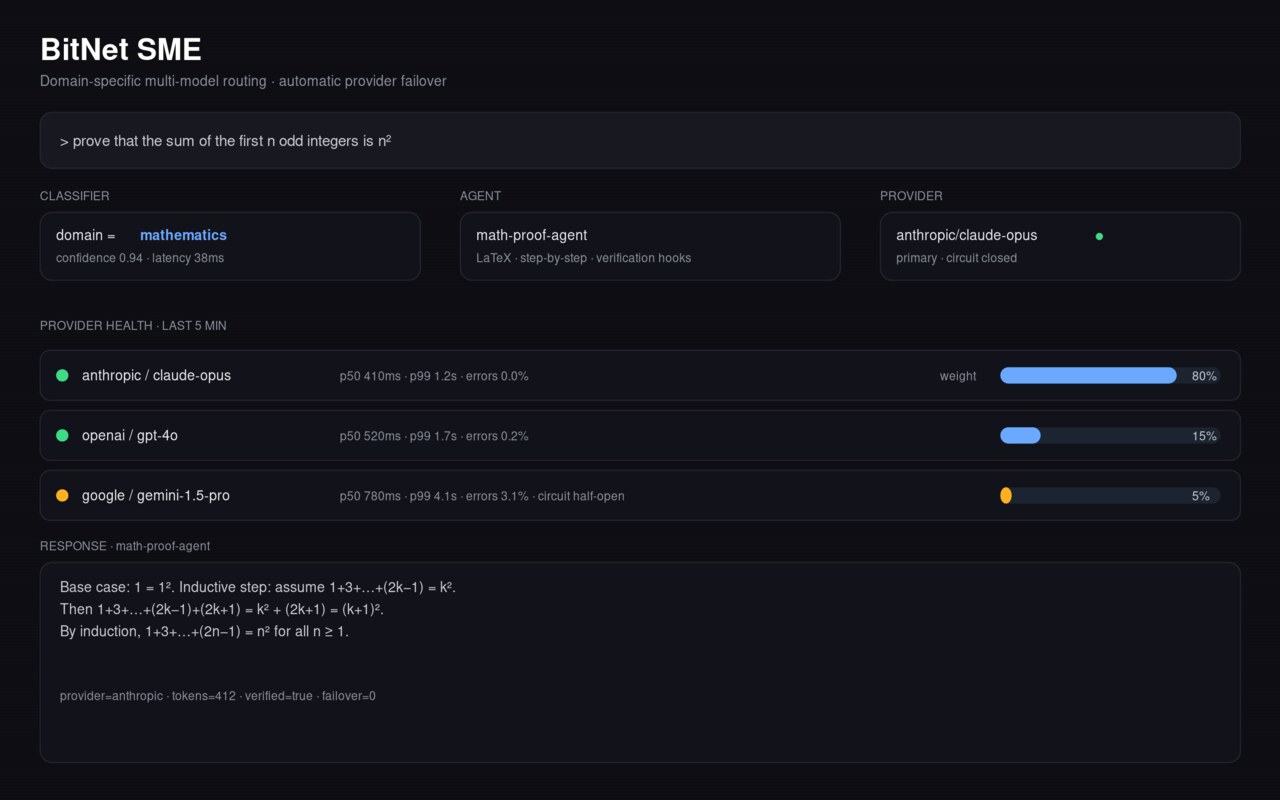
FastAPI framework for serving specialized domain experts over HTTP — math (sympy/numpy), code (AST/subprocess), general knowledge. Multi-provider LLM backends declared as deps and wired next. Postgres + Redis + SlowAPI rate limiting out of the box.

In development Verified Apr 27, 2026

BitNet SME Expert System

A FastAPI scaffold for serving specialized domain experts as HTTP endpoints. Each expert is a Python class owning its domain-specific logic; the framework provides routing, configuration, logging, rate limiting, cache infrastructure, and the plumbing to add LLM backends without rewriting the orchestration layer.

📖 GitHub Repository

Architecture

Domain-Specific Experts

Three experts ship today as local-logic classes under app/experts/:

  • math_expert — symbolic math via SymPy, numerical work via NumPy
  • code_expert — Python code analysis via AST, safe execution via subprocess
  • general_expert — structured knowledge handling, JSON I/O

Each inherits from BaseExpertImpl so adding a new domain is a matter of subclassing and registering. The base class owns configuration, initialization, and the public generate interface.

Request Infrastructure

  • FastAPI main app with async lifespan management
  • SlowAPI rate limiting middleware (per-remote-address)
  • CORS middleware configured
  • Pydantic v2 request/response schemas
  • SQLAlchemy database session handling; PostgreSQL in production, SQLite in dev
  • Redis service wired in Docker Compose for cache / future session state

Multi-Provider Backend (declared — wiring next)

openai, anthropic, and google-generativeai are installed as dependencies alongside sympy/numpy. The intent is for each domain expert to optionally route to an LLM when local logic isn’t sufficient (e.g. math_expert falls back to an LLM for word problems SymPy can’t parse). Today the experts run on local logic only; the LLM routing layer is the next deliverable.

Current State

  • Shipped: FastAPI application with three domain-expert stubs, Pydantic-validated endpoints, rate limiting, Docker Compose bring-up (API + Postgres + Redis), basic test scaffold (tests/conftest.py, tests/test_experts.py)
  • Not yet wired: Multi-provider LLM routing, circuit-breaker / retry logic, Prometheus metrics, Grafana dashboards — all referenced in the README as targets

Future Developments

  • LLM routing layer — per-expert provider selection with a shared client abstraction over OpenAI / Anthropic / Google
  • Circuit breaker + exponential-backoff retry for provider failures
  • Observability stack — Prometheus counters + histograms, Grafana dashboards, structured log enrichment
  • Coverage uplift — the >90% coverage target stays aspirational until the test file count matches the feature surface

Technical Stack

  • Framework: Python ≥3.9 / FastAPI / Uvicorn / Pydantic v2
  • DB: SQLAlchemy + PostgreSQL (prod), SQLite (dev)
  • Cache: Redis (Docker Compose, wired at infra layer)
  • Rate limiting: SlowAPI
  • Domain math/code: SymPy, NumPy, AST, subprocess
  • LLM deps declared: openai, anthropic, google-generativeai
  • Ops: Docker multi-stage build, pre-commit hooks, Makefile, pytest
  • License: MIT

Repository README

🚀 BitNet SME Expert System v2.0

Production-Ready Multi-Model AI Expert System — A comprehensive, scalable expert system that integrates multiple AI providers (OpenAI, Anthropic, Google) to provide specialized expertise in mathematics, code generation, and general knowledge domains.

Python FastAPI Pydantic Docker License Tests CI Security Scans

CI/CD and Branch Protection

  • Core checks run in CI (lint, test, build-container) via make lint, make test, and make build.
  • Security checks run in Security Scans with Bandit configured to fail on high-severity findings and pip-audit for dependency vulnerabilities.
  • To enforce required checks on main, add a repository secret named BRANCH_PROTECTION_TOKEN (PAT with repo admin scope), then run the Configure Branch Protection workflow manually from the Actions tab.

🎯 Overview

The BitNet SME Expert System represents the evolution of AI-powered expert systems, combining the strengths of multiple large language models to provide specialized, domain-specific expertise. Built with modern Python frameworks and enterprise-grade architecture patterns.

Key Features

  • 🧠 Multi-Expert Architecture: Specialized AI experts for mathematics, code generation, and general knowledge
  • 🔄 Multi-Provider Support: Seamlessly integrates OpenAI GPT-4, Anthropic Claude, and Google Gemini
  • ⚡ High Performance: Async/await throughout, optimized for concurrent requests
  • 🛡️ Production Ready: Comprehensive error handling, logging, monitoring, and security
  • 🐳 Containerized: Docker and Docker Compose ready for any deployment
  • 📊 Observable: Built-in metrics, health checks, and structured logging
  • 🧪 Evidence-Based Delivery: Quality claims are tied to CI workflow status, coverage artifacts, and versioned release notes

✅ Delivery Evidence

Project quality and release claims should be validated from CI-linked evidence:

🏗️ Architecture

System Design

graph TB
    A[Client Request] --> B[FastAPI Router]
    B --> C[Expert Service]
    C --> D{Expert Type}
    D -->|Math| E[Math Expert]
    D -->|Code| F[Code Expert]
    D -->|General| G[General Expert]
    E --> H[OpenAI/Anthropic/Google]
    F --> H
    G --> H
    H --> I[Response Processing]
    I --> J[Cache Layer]
    J --> K[Client Response]

Core Components

  • Expert Service: Orchestrates expert selection and request routing
  • Domain Experts: Specialized AI agents with tailored prompts and configurations
  • Provider Abstraction: Unified interface for multiple AI providers
  • Caching Layer: Redis-based intelligent caching for performance
  • Monitoring Stack: Prometheus metrics with Grafana dashboards

🚀 Quick Start

Prerequisites

  • Python 3.9+ (recommended: 3.11+)
  • Docker & Docker Compose (for containerized deployment)
  • Redis (for caching, optional)
  • PostgreSQL (for production, SQLite for development)

1. Clone and Setup

git clone <repository-url>
cd bitnet-sme-expert

2. Environment Configuration

# Copy environment template
cp .env.example .env

# Edit with your API keys and configuration
nano .env

Required Environment Variables:

# AI Provider API Keys
OPENAI_API_KEY=your_openai_api_key_here
ANTHROPIC_API_KEY=your_anthropic_api_key_here
GOOGLE_API_KEY=your_google_api_key_here

# Application Configuration
ENVIRONMENT=development
DATABASE_URL=sqlite:///./bitnet_sme.db
REDIS_URL=redis://localhost:6379/0

🔐 Secure Production Deployment

Use the production template and set every secret/provider flag explicitly:

cp .env.production.example .env

Production hardening requirements:

  • ENVIRONMENT=production must be set.
  • SECRET_KEY and JWT_SECRET_KEY must not use default placeholder values.
  • ALLOWED_ORIGINS must be an explicit allowlist (wildcard * is rejected in production).
  • For each enabled provider (ENABLE_OPENAI_PROVIDER, ENABLE_ANTHROPIC_PROVIDER, ENABLE_GOOGLE_PROVIDER), the matching API key must be present.
  • Sensitive endpoints (/cache/clear, fine-tuning routes, training job status/list) require a valid Bearer JWT with appropriate role claims.

JWT role expectations for sensitive endpoints:

  • admin: required for /cache/clear, /api/v1/train, /api/v1/fine-tune
  • admin or operator: required for /api/v1/training/status/{job_id} and /api/v1/training/jobs

You can provide roles via either role (string) or roles (string list) claims in the JWT.

3. Installation Methods

Option A: Docker Compose (Recommended)

# Start all services (API, database, cache, monitoring)
docker-compose up --build

# API will be available at http://localhost:8000
# Grafana dashboard at http://localhost:3001 (admin/admin)

Option B: Local Development

# Create virtual environment
python -m venv venv
source venv/bin/activate  # or `venv\Scripts\activate` on Windows

# Install dependencies
pip install -r requirements.txt

# Start development server
make dev
# or
uvicorn app.main:app --reload --host 0.0.0.0 --port 8000

4. Verify Installation

# Check API health
curl http://localhost:8000/health

# List available experts
curl http://localhost:8000/api/v1/experts

# Test query
curl -X POST http://localhost:8000/api/v1/query \\
  -H "Content-Type: application/json" \\
  -d '{
    "question": "What is 2 + 2?",
    "domain": "math"
  }'

📚 API Documentation

Interactive Documentation

Once running, visit:

Core Endpoints

Query Expert

POST /api/v1/query
Content-Type: application/json

{
  "question": "Explain quantum computing",
  "domain": "general",
  "context": {
    "max_tokens": 1000,
    "temperature": 0.7
  }
}

List Experts

GET /api/v1/experts

Health Check

GET /health

Expert Domains

Domain Description Best For Default Model
math Mathematical problem solving Equations, calculus, statistics GPT-4o-mini
code Programming and software development Code generation, debugging, algorithms Claude-3.5-Haiku
general General knowledge and reasoning Questions, explanations, analysis GPT-4o-mini

🧪 Expert Capabilities

Mathematics Expert

# Complex mathematical problems
{
  "question": "Find the derivative of f(x) = x^3 * sin(x)",
  "domain": "math"
}

# Statistical analysis
{
  "question": "Calculate the standard deviation of [1,2,3,4,5]",
  "domain": "math"
}

Code Expert

# Algorithm implementation
{
  "question": "Implement quicksort in Python with comments",
  "domain": "code",
  "context": {"language": "python"}
}

# Code review and optimization
{
  "question": "Optimize this SQL query: SELECT * FROM users WHERE age > 18",
  "domain": "code",
  "context": {"language": "sql"}
}

General Expert

# Explanation and analysis
{
  "question": "Explain the impact of climate change on ocean currents",
  "domain": "general"
}

# Research and summarization
{
  "question": "Compare renewable energy sources",
  "domain": "general",
  "context": {"format": "bullet_points"}
}

🔧 Development

Development Commands

# Install development environment
make install-dev

# Start development server with hot reload
make dev

# Run tests
make test

# Run linting and formatting
make lint
make format

# Run security checks
make security

# Generate documentation
make docs

# View all commands
make help

Project Structure

bitnet-sme-expert/
├── app/                          # Application source code
│   ├── api/                     # API routes and endpoints
│   ├── core/                    # Core business logic
│   ├── experts/                 # Expert implementations
│   ├── middleware/              # Custom middleware
│   ├── models/                  # Database models
│   ├── schemas/                 # Pydantic schemas
│   ├── services/                # Business services
│   ├── utils/                   # Utility functions
│   ├── config.py               # Configuration management
│   ├── database.py             # Database setup
│   └── main.py                 # FastAPI application
├── tests/                       # Test suite
├── monitoring/                  # Monitoring configurations
├── docs/                       # Documentation
├── docker-compose.yml          # Development stack
├── Dockerfile                  # Container definition
├── requirements.txt            # Python dependencies
├── pyproject.toml             # Project configuration
└── Makefile                   # Development commands

Adding New Experts

  1. Create Expert Class in app/experts/
from .base_expert import BaseExpert

class MyExpert(BaseExpert):
    async def generate(self, question: str, context: dict) -> dict:
        # Implementation here
        pass
  1. Register Expert in app/services/expert_service.py
self.experts["my_domain"] = MyExpert(config)
  1. Add Tests in tests/test_experts/

Configuration

All configuration is managed through environment variables and app/config.py. Key settings:

  • Model Selection: Choose different models per expert domain
  • Performance Tuning: Adjust timeouts, concurrency, caching
  • Security: Rate limiting, CORS, authentication
  • Monitoring: Metrics collection, logging levels

🚀 Deployment

Production Deployment

Option 1: Docker Production Build

# Build production image
make build-prod

# Run with production configuration
docker run -p 8000:8000 \\
  -e ENVIRONMENT=production \\
  -e DATABASE_URL=$DATABASE_URL \\
  -e OPENAI_API_KEY=$OPENAI_API_KEY \\
  bitnet-sme-expert:prod

Option 2: Kubernetes

# Example k8s deployment
apiVersion: apps/v1
kind: Deployment
metadata:
  name: bitnet-sme-expert
spec:
  replicas: 3
  selector:
    matchLabels:
      app: bitnet-sme-expert
  template:
    metadata:
      labels:
        app: bitnet-sme-expert
    spec:
      containers:
      - name: api
        image: bitnet-sme-expert:prod
        ports:
        - containerPort: 8000
        env:
        - name: ENVIRONMENT
          value: production

Option 3: Cloud Platforms

  • AWS: Use ECS, Lambda, or Elastic Beanstalk
  • GCP: Deploy to Cloud Run, GKE, or App Engine
  • Azure: Use Container Instances, AKS, or App Service

Performance Optimization

  • Horizontal Scaling: Multiple worker processes/containers
  • Caching: Redis for response caching and rate limiting
  • Load Balancing: Nginx or cloud load balancer
  • Database: PostgreSQL with connection pooling
  • Monitoring: Prometheus + Grafana for observability

📊 Monitoring & Observability

Built-in Monitoring

  • Health Checks: /health endpoint with dependency checks
  • Metrics: Prometheus metrics on /metrics
  • Structured Logging: JSON logs with correlation IDs
  • Performance Tracking: Request duration, error rates

Grafana Dashboards

Pre-configured dashboards for:

  • API performance and error rates
  • Expert usage patterns
  • Resource utilization
  • Cache hit rates

Alerting

Configure alerts for:

  • High error rates
  • Response time degradation
  • API key quota exhaustion
  • Database connection issues

🧪 Testing

Running Tests

# Run all tests with coverage
make test

# Run specific test categories
pytest tests/test_experts/ -v
pytest tests/test_api/ -v

# Run with coverage report
pytest --cov=app --cov-report=html

Test Categories

  • Unit Tests: Individual component testing
  • Integration Tests: API endpoint testing
  • Performance Tests: Load and stress testing
  • Security Tests: Vulnerability scanning

Continuous Integration

GitHub Actions workflows are the source of truth for release readiness. Maintain:

  • CI workflow results (tests, lint, build)
  • Security scanning workflow results
  • Coverage artifact publication and link updates in docs/coverage-report.md
  • Release-note updates in CHANGELOG.md

🔐 Security

Security Features

  • Input Validation: Pydantic schemas with strict validation
  • Rate Limiting: Configurable per-endpoint rate limits
  • API Key Management: Secure environment variable handling
  • CORS Configuration: Configurable cross-origin policies
  • Error Handling: Secure error responses without information leakage

Security Best Practices

  1. API Keys: Store in secure environment variables or key vaults
  2. Authentication: Enable JWT authentication for production
  3. HTTPS: Always use TLS in production
  4. Updates: Regular dependency updates with security scanning
  5. Monitoring: Log and monitor for suspicious activity

🤝 Contributing

Development Workflow

  1. Fork the repository
  2. Create a feature branch (git checkout -b feature/amazing-feature)
  3. Install pre-commit hooks (pre-commit install)
  4. Make your changes with tests
  5. Run quality checks (make check)
  6. Commit with conventional commits
  7. Push and create a Pull Request

Code Standards

  • Python: Follow PEP 8 with black formatting
  • Type Hints: Full type annotation required
  • Documentation: Docstrings for all public functions
  • Testing: Tests required for new features
  • Security: Security review for external integrations

📈 Roadmap

Upcoming Features

  • Fine-tuning Support: Custom model fine-tuning capabilities
  • Streaming Responses: Real-time response streaming
  • Multi-modal: Image and document processing experts
  • Workflow Engine: Complex multi-step expert interactions
  • A/B Testing: Built-in experiment framework
  • Advanced Analytics: Usage patterns and optimization insights

Performance Goals

  • Sub-100ms P95: Response time optimization
  • 99.9% Uptime: High availability architecture
  • 10K+ RPS: Horizontal scaling capabilities
  • Cost Optimization: Intelligent model routing for cost efficiency

📄 License

This project is licensed under the MIT License - see the LICENSE file for details.

🙏 Acknowledgments

  • FastAPI: Modern, fast web framework for building APIs
  • Pydantic: Data validation and settings management using Python type annotations
  • OpenAI: GPT models for natural language processing
  • Anthropic: Claude models for advanced reasoning
  • Google: Gemini models for multi-modal capabilities

📞 Support


Built with ❤️ by SUM Equities

Transforming AI capabilities into production-ready expert systems.